
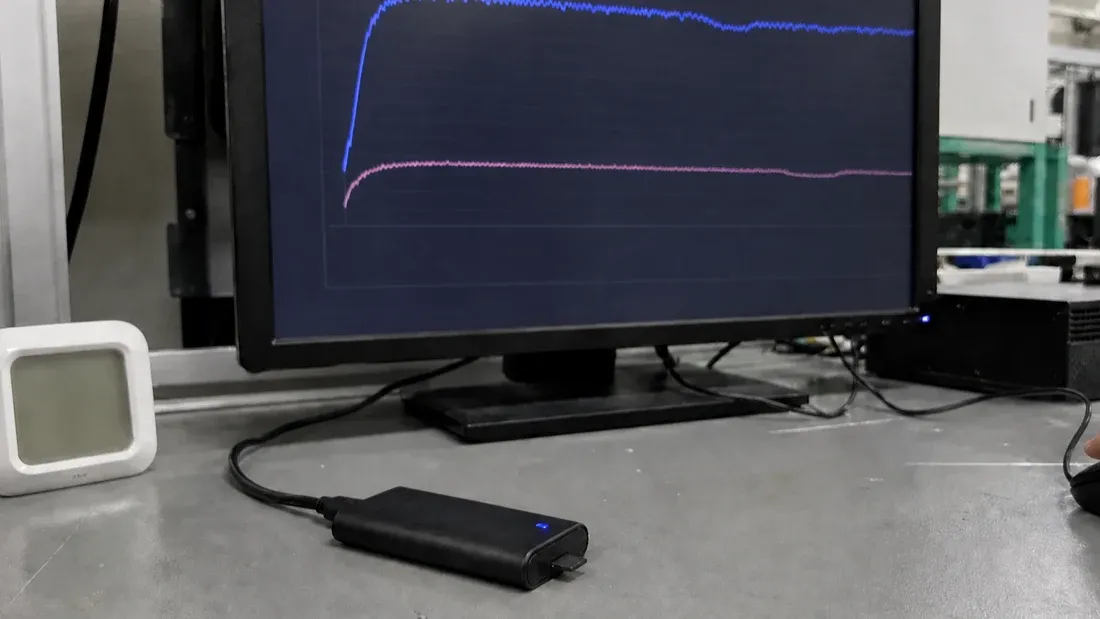
How to test microSD sustained write speed: reader, cache, fill state and V30 limits
- A short desktop result above 30 MB/s does not by itself certify a card as U3 or V30; it documents only that tool and test chain.
- Freeze card identity, reader path, host, cache policy, filesystem, fill state, workload, temperature and measurement window before comparing samples.
- Keep the complete time-series curve because an average can hide cache exhaustion, garbage-collection pauses and low-tail write behavior.
- Desktop testing screens candidates; final approval belongs in the target camera, dashcam or MDVR at the agreed bitrate, overwrite state and temperature.
A credible microSD speed test begins with a specific decision: screen an abnormal card, compare candidate configurations, or confirm that a target recorder can sustain its workload. The method must separate short peaks from sustained media behavior and separate the card from the reader, USB link, operating-system cache, filesystem and temperature.
U3 and V30 both identify a 30 MB/s minimum write-speed class within their respective SD classification systems. A generic desktop average above 30 MB/s does not independently grant or certify either mark. The correct statement is: under the listed host, reader, software, data size and card state, the measured sustained-write result was X.
Why “read and write both exceed 30 MB/s” is the wrong rule
SD Association defines Speed Class, UHS Speed Class and Video Speed Class around minimum write performance. Read speed above 30 MB/s is not an equivalent U3 criterion, and the large “up to” read number on packaging is not a minimum sustained-write guarantee [1].
A desktop benchmark is useful for anomaly screening and comparison. However, unless it implements the corresponding standard method and conditions, its result must not be described as “SD Association U3/V30 certified.” The tool, reader and host are instruments in a project test, not a standards laboratory by declaration.
Freeze the variables before measuring
| Category | Record | Risk if omitted |
|---|---|---|
| Card | model, capacity, sample ID, lot, label class, new or used state | capacity and lot differences become invisible |
| Reader path | reader, adapter, cable, port and negotiated path where available | reader ceiling may be blamed on the card |
| Host | computer, OS, power mode and background load | workstations cannot be compared |
| Cache | software I/O mode, removable-media policy and flush behavior | memory-cache speed may be reported as media speed |
| Media state | filesystem, formatter, free space and write/delete history | fresh-card behavior may hide later slowdown |
| Workload | block or file size, queue, data size, duration and read/write ratio | the benchmark cannot be reproduced |
| Environment | ambient and reader/card temperature, test order | thermal drift is ignored |
Three decimal places do not compensate for missing conditions.
Do not use USB connector colour as evidence
The visible port colour is not a link measurement. The reader may support a slower SD bus, the cable or adapter may degrade the path, the port may share an internal hub, and the host controller or driver may impose a ceiling.
A controlled station should:
- use a documented reader whose capability covers the intended card and bus mode;
- keep cable and physical port fixed;
- record device and connection information exposed by the OS;
- verify station headroom with a reference medium faster than the target range;
- investigate the host path if different cards stop at the same plateau.
SD Association distinguishes Default Speed, High Speed, UHS and SD Express bus families. Card and host must negotiate a mutually supported path; a faster card cannot add capability to a slower reader [2].
How cache creates an inflated result
After a benchmark issues a write, data may first enter host memory, filesystem buffers or device cache. A small test or the first few seconds may measure cache acceptance rather than sustained NAND programming.
Microsoft documents removable-storage policies such as Quick removal and Better performance. Better performance permits write caching and requires safe removal so cached operations complete [5]. Results from different policies therefore cannot be compared without disclosure.
Controls include:
- use documented direct or unbuffered I/O when the tool genuinely supports it;
- if testing at file level, use enough data and disclose the cache boundary;
- save the time-series curve instead of only the final average;
- wait for the tool to finish and flush before removing the device;
- keep operating-system and tool settings constant.
Using a data set larger than system memory can reduce some host-cache effects, but it does not automatically remove filesystem, device-cache or software-algorithm differences.
Why fill state and write history matter
SD Association notes that repeated deletion and writing can create fragmentation and that Speed Class writing is defined in unfragmented Free AU areas [1]. A freshly formatted result cannot represent every later state.
Project validation should distinguish:
- baseline: card prepared by the agreed formatter or target device;
- long sequential write: initial peak, stable region and later decline;
- agreed fill level: repeated measurement near the intended operating state;
- post-overwrite state: after deletion, loop recording or other controlled history;
- target-host state: media formatted and exercised by the actual recorder.
The purpose is not to recreate standards certification informally. It is to establish whether the identified card retains the margin required by the project workload.
A practical sustained-write procedure
1. Define the decision and threshold
State whether the run screens gross underperformance, compares candidates or validates a recorder. Define the measurement window, minimum or percentile, allowed stall duration and repeat count before seeing results.
2. Establish station baseline
Fix the host, reader, cable, port, OS, power and cache policy. Run a reference card and record the baseline date.
3. Prepare the media state
Preserve sample identity, then format with the agreed SD Association tool or target device. Record Quick or Overwrite mode. Formatting itself is neither a capacity-verification test nor speed-class certification.
4. Run beyond the initial cache interval
The write must continue into an observable sustained region. Save bytes, duration, complete curve, stable-window statistics and interruptions. Do not crop the report to the maximum number.
5. Repeat with controlled order
Predefine repeats. When testing multiple cards, alternate samples or restore the station to the agreed temperature so later samples do not inherit a hotter reader.
6. Verify in the target device
For a camera, dashcam, surveillance recorder or MDVR, use the exact model, firmware, highest agreed bitrate, concurrent channels, overwrite behavior and temperature boundary. Inspect file continuity and required clips; “the device showed no warning” is not sufficient evidence.
Read the time-series curve, not one number
| Curve pattern | Plausible causes | Next action |
|---|---|---|
| High start, lower stable plateau | card cache exhaustion, garbage collection or host cache exit | extend the run and judge the sustained window |
| Periodic sawtooth | internal management, cache flush, filesystem or background task | repeat on the fixed station and compare periodicity |
| Many cards share one ceiling | reader, USB or host bottleneck | use the reference medium or another controlled path |
| Speed declines after warming | thermal effect, throttling or host competition | record temperature and run a controlled cold comparison |
| Isolated short dip | scheduling, flush or internal activity | check repeatability and project threshold |
| Average passes but repeated lows fail | average hides tail risk | use a stable-window minimum or agreed low percentile |
A smooth curve is not itself a pass criterion. The rule must identify window, allowable variation, lower statistic, failures and target-device follow-up.
What a procurement report should contain
Each sample should be linked to card identity, capacity and lot; reader and port; operating system and cache policy; filesystem and formatting method; data size and duration; full curve; stable-window average and minimum or percentile; temperature; repeats; and exceptions.
Avoid writing only “U3 passed.” A reviewable statement is:
Sample A was continuously written under the specified computer, reader, software version and data size. The report retains the complete curve and stable-window statistics. This project-screening result is not SD Association speed-class certification; the sample still requires the target recorder's maximum-load and loop-overwrite verification.
Kalstor can structure a test matrix around the customer's host, capacity, bitrate and temperature range and connect candidate samples, raw logs and later lot identity. Product marks, acceptance limits and configuration boundaries remain subject to the agreed specification.
For application validation, continue with the dashcam and security-camera selection guide and the V30/V60/V90 camera-card guide.
FAQ
Does a desktop write result of 35 MB/s prove U3 or V30?
Why can recording fail when read speed is high?
Is a test on a freshly formatted card sufficient?
Does low speed always mean the card is defective?
References
- SD Association — Speed Class definitions and minimum write-speed classes ↩
- SD Association — SD bus-speed families and host matching ↩
- SD Association — SD Memory Card Formatter ↩
- SD Association — SD Memory Card Formatter FAQ ↩
- Microsoft Learn — Windows external-storage removal and write-cache policy ↩
We publish measured usable capacity and define trial-batch verification against the quoted product and agreed test scope.